
PS Remote Play transforms your gaming experience by letting you take your PlayStation® beyond the living room. Whether you have a PS5™ or PS4™, this app connects your console to your Android mobile device remotely. Play your favorite games from anywhere with simple, flexible control.
Features and Functionality
PS Remote Play includes a full set of features to improve your gaming:
1. Remote Screen Display:
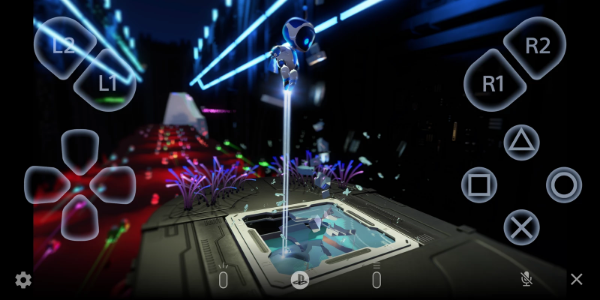
- Stream your PS5™ or PS4™ console screen directly to your Android device, delivering console-quality gaming wherever you go.
2. Mobile Control Options:
- Use the on-screen controller on your mobile for smooth game navigation. Android 10 or later works with a DUALSHOCK®4 wireless controller; Android 12 or later supports the DualSense™ wireless controller; Android 14 or later adds compatibility with the DualSense Edge™ wireless controller for an authentic console feel.
3. Voice Chat Integration:
- Join voice chats through your mobile device's microphone, keeping you connected with friends and other players during gameplay.
4. Text Input Capability:
- Easily type text on your PS5™ or PS4™ console using your mobile keyboard, making in-game communication and app interaction simple.
5. Compatibility Requirements:
- You'll need: Android 9 or later on your mobile, the latest system software on your PS5™ or PS4™ console, and an active PlayStation Network account. A stable internet connection is required for smooth performance.
6. Data Usage Considerations:
- When using mobile data, be aware of possible data charges as consumption is higher than typical video streaming. Connectivity can vary depending on your carrier and network.
7. Verified Devices:
- PS Remote Play is optimized for verified devices like the Google Pixel 8, 7, and 6 series for best performance. Unverified devices may not work fully.
8. Controller Compatibility:
- Flexible controller options: DUALSHOCK®4 wireless controller on Android 10+, DualSense™ wireless controller on Android 12+, and DualSense Edge™ wireless controller on Android 14+.
9. Performance Considerations:
- Depending on your mobile device, you may notice input lag when using wireless controllers, which can affect game responsiveness.
Usage Guidelines and Notes
PS Remote Play enhances your PlayStation® gaming, but keep these points in mind:
- Device Compatibility: Use a verified mobile device for best results. Unverified devices may not support all features or games.
- Game Compatibility: Some games may not fully support Remote Play or need special setup.
- Controller Experience: Vibration and other controller features might feel different compared to playing directly on your PS5™ or PS4™.
- Input Lag: Depending on your device and network, wireless controllers could have noticeable input lag.
Conclusion:
PS Remote Play marks a major step in gaming accessibility, giving PlayStation® fans the freedom to enjoy their favorite games remotely on Android devices. By connecting PS5™ or PS4™ consoles with mobile, this app lets you stream gameplay, control your console, join voice chats, and interact easily with a variety of supported controllers. With convenient features like text input and real‑time screen streaming, PS Remote Play keeps you connected to your gaming world, no matter where you are.
v7.0.3
39.70M
Android 5.1 or later
com.playstation.remoteplay